
You can log cardio as its own session, or add it to a lifting workout as a block. Both count toward your conditioning ring.
Log a cardio session on its own
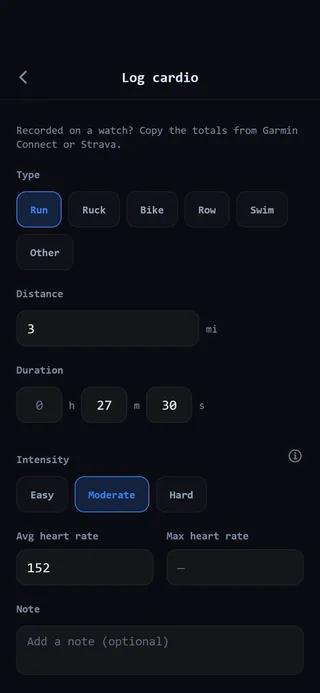 Log cardio: pick the type, then fill in what you know.
- Tap Quick Workout on the Home tab.
- Before adding anything else, tap Add block.
- Under Cardio, tap Cardio. Because the workout is empty, the cardio form opens in its place.
- Pick a Type: Run, Ruck / weighted hike, Bike, Row, Swim or Other.
- Enter the Duration. This is the one field every session needs.
- Add the Distance if you have it.
- Choose an Intensity: Easy, Moderate or Hard. It starts on Moderate.
- For a ruck, enter the Load carried. A ruck can’t be saved without it.
- If you like, add your Avg heart rate, Max heart rate and a Note.
- Logging something from an earlier day? Change the Date with the arrows. It can go back up to 30 days.
- Tap Save session.
If cardio is part of a routine or your program, its card shows a Log cardio button instead of Start Workout. Tapping it opens the same form with your targets filled in.
Add cardio to a lifting workout
- On the workout screen, tap Add block, then Cardio.
- Pick the type and set at least one target: distance, duration, or load.
- Tap Add to workout.
- When you’ve done it, tap Log it on the cardio block, fill in what you did, and tap Save.
How cardio earns XP
Cardio is measured in effort minutes. That’s your time scaled by how hard it was: easy minutes count half, moderate count once, and hard minutes count double. Each effort minute is worth 2 XP, up to 350 effort minutes a week.
A cardio session of 10 minutes or more also earns the 50 XP workout bonus. Shorter sessions still earn their effort minutes. The 10-minute floor is there so lots of very short sessions can’t each collect a full bonus.
Your first session of each type sets your starting records. After that, GainGames tracks things like your longest session, your fastest mile, 5K and 10K, and your heaviest ruck. New cardio records earn one 50 XP award per session, however many you set.
Fix a cardio session later
Open the session from History on the Progress tab and tap Edit. Change what you need and tap Save changes. To remove it, tap Delete session. Deleting takes back the XP it earned, and your records get recalculated.