
You can take your data out of GainGames at any time. The export has everything you’ve logged: workouts, routines, programs, records, week scores and goals. Sample data is never included.
Open the export screen
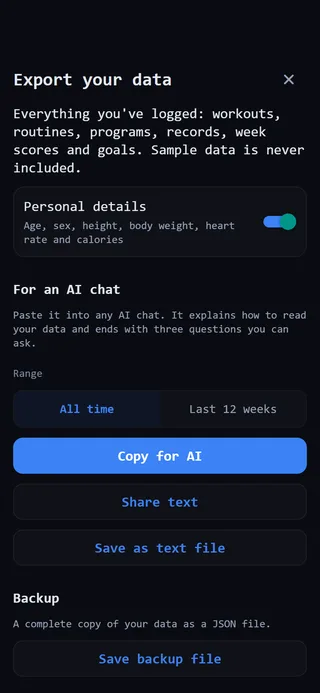 The export screen.
- Open the Profile tab.
- Tap the gear at the top right to open Settings.
- Under Data and sync, tap Export your data.
Choose what to include
Personal details is on to start with. It adds your age, sex, height, body weight, heart rate and calories. Turn it off and the export says those were left out.
Export for an AI chat
The text export is written so an AI chat can read it. It explains how to read your data, includes facts GainGames has already worked out, like your estimated maxes and weekly sets per muscle, and ends with three questions you can ask.
- Under For an AI chat, choose a Range: All time or Last 12 weeks.
- Pick how to send it:
- Copy for AI copies the text. You’ll see Copied. Paste it into your AI chat.
- Share text opens the iPhone share sheet, so you can send it to Notes, Messages, Mail or an app.
- Save as text file makes a text file and opens the share sheet, where you can pick Save to Files or another app.
- Paste or open it in the AI chat of your choice.
The computed facts are there so the AI uses GainGames’ numbers for your trends instead of working them out again and getting them wrong.
Save a backup file
- Under Backup, tap Save backup file.
- The share sheet opens. Choose where to keep the file, such as Files or iCloud Drive.
The backup is a complete copy of your data as a JSON file. It always covers all time, whatever range you picked above.
If something doesn’t work
If copying fails, you’ll see That didn’t work. Try Share text instead. If sharing fails, try it again. If you see Saving files needs the latest version of the app., update GainGames from the App Store and try again.
How to read the text
A few things that help if you read the export yourself:
- Each workout starts with a line giving the date, name and length. Each exercise then gets one line of sets.
- A set like
100x5is 100 for 5 reps, in your weight unit. - A
wbefore a set marks a warm-up. Warm-ups never count toward records or volume. @2after a set means 2 reps in reserve, and*means the set was a personal record when you did it.