
A progression rule lives on an exercise inside a routine. Each time you start that routine, the rule looks at how you did last time and fills in new targets.
Add a rule
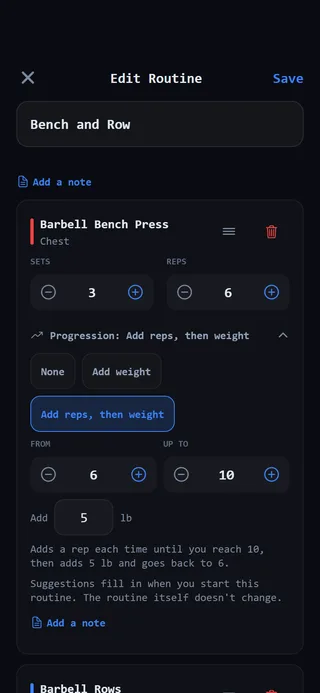 A progression rule on an exercise in a routine.
- Open the Programming tab and select Routines.
- Tap Edit on the routine. To make a new one, tap New. The Edit Routine or New Routine screen opens.
- Under the exercise, tap the row that reads Progression: None.
- Pick a rule. The choices depend on how the exercise is measured:
- For exercises measured in reps: Add weight or Add reps, then weight.
- For timed exercises: Add time.
- For exercises measured by distance: Add distance.
- Adjust the numbers for the rule you picked (see below).
- Tap Save at the top right.
The row now shows the rule, for example Progression: Add weight. To turn it off, open the row again and pick None.
Set the numbers
Add weight: set how much to Add. It starts at 5 lb, or 2.5 kg if you train in kilograms.
Add reps, then weight: set a rep range with From and Up to, and how much weight to Add. From starts at the routine’s target reps, or 8 if there isn’t one, and Up to starts 4 reps higher.
Add time or Add distance: set the step to Add, in Seconds or Meters. Time starts at 5 seconds and distance at 10 meters.
Under the choices, the app explains in a sentence what the rule will do with your numbers. Read it to check you’ve set what you meant.
Where rules work
Progression rules can be set on exercises in Sets, Superset and Circuit blocks. Conditioning and cardio blocks don’t progress.
The rules are a routine feature. You won’t see the Progression row when you use Build a workout or add a block to a workout that’s already going.
What happens next
Nothing changes in the routine itself. The next time you start it, from its card or from your program, the suggested targets are filled in for that workout only. You can still change any number before or during the set.
For how the suggestions are worked out, see How progression rules work.